Saturday, February 27, 2010
Windows Phone 7 Series UI Clone being Developed for WM 6.x
You knew this was coming and that it was only a matter of time, but there’s now a Windows Phone 7 Series themed shell being developed by Jaxbot at XDA-developers. It’s not much to look at right now, seeing how it’s a new project and riddled with bugs, but it’s still kind of intriguing to see. Check out the video preview below.
It’s only an alpha, but here’s what’s working so far:
• Set Phone, Text, Outlook, and People to a certain app
• See upcoming appointments on lock screen
• See information on live tiles
There’s no doubt that an unofficial WP7S UI would be popular among the WM community, so it’s good to see the ball rolling already. I wouldn't mind seeing that lockscreen released as a separate app when it's polished off and completed :). Take the early test release for a spin (VGA/WVGA only) and view the discussion at XDA-developers.
It’s only an alpha, but here’s what’s working so far:
• Set Phone, Text, Outlook, and People to a certain app
• See upcoming appointments on lock screen
• See information on live tiles
There’s no doubt that an unofficial WP7S UI would be popular among the WM community, so it’s good to see the ball rolling already. I wouldn't mind seeing that lockscreen released as a separate app when it's polished off and completed :). Take the early test release for a spin (VGA/WVGA only) and view the discussion at XDA-developers.
Tuesday, February 23, 2010
Download Swype v3.9 for HTC HD2
There is a new version of Swype for HTC HD2 floating around the Internet now. Some said that this version 3.9.10.10.5032 was extracted from the leak T-Mobile USA HTC HD2 ROM. It was redesigned to suite HTC HD2 and has bigger soft keypads.
Well, I only tested Swype v3.9 on HTC HD2. I believe it will work on other Windows Mobile devices with WVGA screen size . By the way, you can get the older version here.
Download Swype v3.9 here.
Monday, February 22, 2010
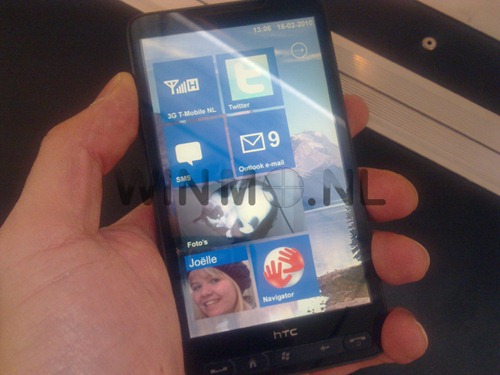
HTC HD2 Caught Running Windows Phone 7 Series
Keep in mind though that such images can easily be Photoshopped to look like the real deal when it is not. HTC HD2 by all means meets all the specs which Microsoft has made mandatory for a Windows Phone 7 Series device including a 1Ghz processor, over 512MB of RAM, a large multitouch capacitive touchscreen and so on. The only hardware requirement which HD2 is missing is the dedicated Bing search button for the device. Currently though, neither Microsoft nor HTC has denied the possibility of Windows Phone OS 7.0 upgrade for HTC HD2. This is what the official Windows Phone account on twittersaid about this possible upgrade.
to everyone asking about HD2 & Windows Phone 7 Series; nothing announced yet but there may be info coming next monthMicrosoft CEO Steve Ballmer unveiled the next generation of Windows phones called theWindows Phone 7 Series in his keynote address at the Mobile World Congress 2010.Windows Phone 7 Series refers to the next-generation Windows phones running Windows Phone OS 7.0.
Via:redmondpie
WinMo 7 Startup Screen
Windows Phone 7 series was released merely 5 days ago and already [ElCondor] has a new startup for it. [ElCondor] took the newest design, logo and slogan of WP7S and made it into something that enhances your excitement of restarting your device. The startup is made for all resolutions, so no one is left out, and all you do is install the CAB and your set.
“This looks pixilated but the dithering isn’t visible on your screen! It prevents gradient banding.”
More info here XDA-Dev
Hold on guys!
I just got back from vacation, updates and new tweaks will be published later today.
Thanks guys.
Thanks guys.
Friday, February 12, 2010
Opera Mobile 10.3 released, now supports Windows Mobile Standard, Flash Lite
The latest version of Opera Mobile 10 has now been released for Windows Mobile. Beta 3 does not bring much user interface changes, but does finally bring a modern Opera browser to Windows Mobile Standard.
Additional features include Flash Lite support, and due to the Click to play feature this will not slow down the browser in general use. Flash Lite 3.1 support is disabled by default, but can be enabled by visiting Tools -> Settings -> Advanced and set plug-ins to "On".
The main improvements from the previous betas are:
- keypad/smartphone support
- Flash Lite 3.1 support (disabled by default)
- Complete bookmark sync in Opera Link
- BIDI support also for language extensions
- phone numbers in plain text are converted to links
- support for background sound
- general bug fixing (stability, UI)
Known issues include:
- Opera Link: Bookmarks saved in Beta 2 are lost when upgrading to Beta 3
- Hotmail does not work, please use the mobile version www.hotmail.com/m
- Dragonfly – need to do ‘connect’ two times in a row to get a connection working
- Flash is only a preview/in alpha state, expect instabilities, performance degradation during use
- Flash is only supported on touch devices
- Need to double-click on Flash content to view it in full-screen, another double-click to return
- right-to-left support is not complete in the UI
- On certain WM5 Smartphone/WM6 Standard devices, the dictionary is not disabled in the password field
- Unable to type special characters on Moto Q9
- Certain HTC devices with TouchFLO will force Opera back to portrait mode if visiting home screen when Opera is in landscape
- Some input method editors are known not to work well with Opera because they do not comply with Microsoft’s SIP and/or IME standard.
Unfortunately there is no support for multi-touch or the accelerometer on the HTC HD2 at present.
Read more on www.opera.com/mobile or download the browser atwww.opera.com/mobile/download/ from a PC or "m.opera.com" from a mobile phone.
Via: wmpoweruser
Subscribe to:
Posts (Atom)